

In This Article
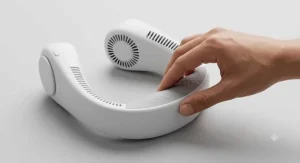
A rechargeable neck fan is a hands-free, battery-powered personal fan that hangs around your neck and blows air onto your face and upper body, charged via USB rather than disposable batteries. It’s the gadget equivalent of bringing your own weather system with you — small enough to forget you’re wearing it, powerful enough to make a stuffy commute bearable.

If you’ve spent even one British summer wilting on a delayed train or sweating through a “just popping to the shops” errand, you already understand the appeal. Handheld fans need a free hand you don’t have. Desk fans don’t follow you to the bus stop. A rechargeable neck fan, on the other hand, just sits there quietly doing its job while you get on with yours — no fiddling, no flapping, no dropped phone because you were trying to fan yourself and scroll at the same time.
This guide digs into seven real models currently sold in the UK, spanning cheap-and-cheerful options under £25 to premium semiconductor-cooled fans that do more than just push warm air around. We’ll compare battery capacity, USB-C charging speed, noise levels and comfort, and — because a spec sheet only tells half the story — we’ll translate what those numbers actually mean when you’re stuck on the Central Line in July. According to UK Health Security Agency guidance, forecasters expect an increased chance of heatwaves this summer, so getting this purchase right isn’t just about comfort — it’s about coping sensibly with genuinely uncomfortable heat.
Quick Comparison Table
Before we get into the detail, here’s the shortcut version. If you only read one table in this article, make it this one — it maps each fan to the buyer it suits best.
| Fan | Battery | Runtime (claimed) | Charging | Best For |
|---|---|---|---|---|
| TORRAS COOLiFY | 6000mAh | Up to 8h (fan mode) | USB-C | Premium chip-cooled airflow |
| JISULIFE FA14 | 4000mAh | 2–13.5h (speed dependent) | USB-C, 5V/2A | Best all-rounder comfort |
| Warmco Portable Neck Fan | 10,000mAh | Up to 30h | USB-C | Longest battery life |
| PluvoFan Slim | 8000mAh | Multi-day light use | USB-C | Slimmest, lightest carry |
| Yannovus Cooling Plate Fan | 6000mAh | Varies by mode | USB-C | Fine-tuned digital control |
| Geepas 2000mAh Neck Fan | 2000mAh | Up to 6h | USB-C, ~2.5h charge | Cheapest sensible entry |
| Peiyuu LED Neck Fan | 5200mAh | 3–12h | USB-C | Budget with brushless motor |
Reading this table, a pattern jumps out fast: battery capacity and runtime don’t move in a straight line together. The Warmco Portable Neck Fan has more than double the mAh of the JISULIFE FA14 but the runtime gap isn’t quite double, because motor efficiency and how many speed settings you actually use both matter as much as raw capacity. Meanwhile, the Geepas 2000mAh Neck Fan proves you don’t need a huge battery for a genuinely usable fan if the motor is efficient enough — its measured runtime nearly matches fans with double its capacity. The takeaway before you even open a product page: don’t buy on mAh number alone, and we’ll explain exactly why in the sections below.
💬 Just one click — help others make better buying decisions too!😊
Top 7 Rechargeable Neck Fans: Expert Analysis
We’ve picked seven real, currently available models that span budget, mid-range and premium price brackets, plus a couple of genuinely different approaches (cooling plates, semiconductor chips) so you can see what your money actually buys as you go up in price.
1. TORRAS COOLiFY — chip-cooled air, not just moving warm air
Most “cooling” fans just move the air that’s already around you, which is fine until the air itself is 28°C. The TORRAS COOLiFY does something different: it uses a semiconductor (Peltier) cooling plate against the back of your neck alongside its 6000mAh battery and dual-airflow vents, so the air genuinely feels colder rather than just moving faster.
The 6000mAh cell charges via USB-C and the fan itself weighs in around 285-350g depending on the exact model in the range, with a claimed noise level as low as 31dB on low settings — genuinely conversation-friendly. On paper this means you get real skin-temperature reduction rather than the placebo effect a lot of budget fans rely on, which is a meaningful difference if you’re dealing with genuine heat intolerance rather than mild discomfort. What most buyers overlook about this model is that the semiconductor cooling function draws considerably more power than fan-only mode, so the headline runtime figures apply mainly when you’re using it as a straightforward fan.
Reviewers consistently report that the cooling-chip function delivers a noticeably colder sensation than any bladeless competitor, though several also note that battery life drops sharply — down to two or three hours — once the cooling plate is running continuously rather than just the fan. This is a fan for people who find “just moving air” genuinely insufficient, not casual commuters happy with a breeze.
Pros:
- ✅ Semiconductor chip delivers real cooling, not just airflow
- ✅ USB-C charging with quiet 31dB low-speed operation
- ✅ Ergonomic dual-airflow design fits most neck sizes
Cons:
- ❌ Cooling mode drains the battery much faster than fan-only use
- ❌ Sits at the top of the price bracket for this category
At the premium end of the market, typically in the £90-£150 range depending on the exact variant, the TORRAS COOLiFY only really earns its price tag if you specifically want active cooling rather than airflow — for that use case, it’s genuinely difficult to match.

2. JISULIFE FA14 — the best all-rounder for everyday comfort
The JISULIFE FA14 is the fan most likely to turn up in a “best of” list for good reason: it’s the sensible middle ground between price, comfort and battery performance, without leaning hard into any one gimmick.
Its 4000mAh lithium-ion cell (rated 14.8Wh at 3.7V) charges through USB-C at 5V/2A, taking roughly 3.5-4.5 hours from flat and running anywhere from 2 to 13.5 hours depending on which of its three speeds you leave it on. Based on the spec comparison with rivals in this article, that wide runtime range is actually a strength rather than a weakness — it means the fan scales genuinely usefully between “gentle desk breeze all afternoon” and “maximum blast for twenty minutes on a packed platform.” At around 270g and shaped like a pair of headphones, it disappears onto your shoulders in a way bulkier fans don’t manage.
Aggregated customer feedback across retailer and review sites consistently highlights how the bladeless, 78-outlet design spreads airflow evenly around the whole neck rather than blasting one narrow jet, and reviewers frequently mention forgetting they’re wearing it after the first few uses — a good sign for all-day comfort. A recurring theme in feedback is that the lowest speed setting is whisper-quiet, making it genuinely usable in an office, while the top setting is loud enough that some reviewers reserve it for outdoor use only.
Pros:
- ✅ Wide 2-13.5h runtime range across three speeds
- ✅ Lightweight, bladeless 78-outlet design spreads air evenly
- ✅ USB-C charging compatible with most existing phone chargers
Cons:
- ❌ Top speed setting is noticeably louder than rivals
- ❌ Only three speed settings versus finer digital controls elsewhere
Sitting comfortably in the mid-range, typically £25-£40, the JISULIFE FA14 is the model we’d point a first-time buyer towards if they want one fan that does everything reasonably well.
3. Warmco Portable Neck Fan — the biggest battery in this line-up
If your priority is simply “I never want to think about charging this thing,” the Warmco Portable Neck Fan answers that brief directly with a 10,000mAh battery — more than double most rivals here — paired with a built-in LED display and four speed settings.
The headline claim is up to 30 hours of runtime on the lowest setting, and even allowing for the usual gap between marketing numbers and real-world use, a battery this size means multi-day trips or festival weekends without hunting for a plug socket. Here’s what to weigh: a 10,000mAh cell is also physically heavier than a 2000mAh one, so this fan trades some of the featherweight comfort of smaller models for genuine battery security. For anyone who’s ever had a smaller neck fan die halfway through a hot afternoon, that trade feels worth making.
Reviewers frequently single out the LED display as genuinely useful rather than a gimmick, since it lets you glance down and check remaining charge instead of guessing — something several cheaper fans in this category skip entirely. Feedback also notes the 360° airflow pattern feels less directional than the twin-vent designs on some rivals, which some users prefer for even coverage and others find less targeted when they want a strong jet on one side.
Pros:
- ✅ Enormous 10,000mAh battery for multi-day use
- ✅ LED display shows exact remaining charge
- ✅ Four distinct speed settings for fine control
Cons:
- ❌ Heavier on the neck than smaller-battery rivals
- ❌ 360° airflow feels less directional than twin-vent designs
At a typical £25-£35 range, the Warmco Portable Neck Fan offers a genuinely unusual amount of battery capacity for the price, making it the natural pick for travellers and festival-goers.
4. PluvoFan Slim — the lightest, most discreet carry
Not everyone wants a chunky gadget hanging off their shoulders. The PluvoFan Slim targets that gap directly, packing an 8000mAh battery into a noticeably slimmer, lighter bladeless housing than most competitors manage at that capacity.
With six speed settings and a “direct breeze” bladeless airflow system, the standout here isn’t raw power — it’s the fact that Pluvofan has fitted a genuinely large battery into a housing thin enough to sit under a jacket collar or scarf without looking bulky. What most buyers overlook about slim-format neck fans is that thinner housings can sometimes mean smaller motors and weaker airflow, but the six-speed range here suggests the engineering has kept pace with the slimming down, giving you finer control than the typical three-speed budget fan.
Aggregated review sentiment describes the fit as comfortable even for people with long hair, since the bladeless design avoids any risk of catching or tangling, and multiple reviewers note the unit is quiet enough on lower settings to use discreetly in an office or on public transport. A common thread in feedback is appreciation for how unobtrusive the slim profile feels compared with bulkier neck fans people have owned previously.
Pros:
- ✅ Slim, lightweight housing despite an 8000mAh battery
- ✅ Six speed settings for granular airflow control
- ✅ Bladeless design safe for long hair and loose clothing
Cons:
- ❌ Slimmer housing means a smaller physical grip when adjusting
- ❌ Six speeds can feel fiddly to cycle through mid-use
Priced in the £20-£30 bracket typically, the PluvoFan Slim is the right call if discretion and comfort under clothing matter as much as raw cooling power.
5. Yannovus Cooling Plate Fan — digital precision with cooling plates
The Yannovus Cooling Plate Fan sits in an interesting middle ground between a pure airflow fan and the semiconductor-cooled premium models, combining a 6000mAh battery with built-in cooling plates and an unusually granular 1-100 speed control dial rather than the usual three or four fixed steps.
That fine-grained control is the genuine differentiator here: instead of jumping from “gentle” to “gale force” in one click, you can nudge the airflow up or down in small increments until it matches exactly what the moment calls for. Paired with a digital display and adjustable air outlets, on paper this means considerably more precision than fixed-speed rivals — useful if you’re sensitive to either too little or too much airflow rather than wanting an all-or-nothing setting.
Review sentiment around cooling-plate neck fans in this price bracket tends to note that the plates provide a mild, noticeably cooler sensation against the skin compared with airflow-only models, though the effect is less dramatic than dedicated semiconductor units like the TORRAS COOLiFY. Users in this segment also commonly mention that digital displays and adjustable outlets add a sense of control that flat-rate fans lack, even if the core cooling technology is similar to cheaper alternatives.
Pros:
- ✅ 1-100 speed dial offers far more precision than fixed settings
- ✅ Built-in cooling plates add a noticeable chill beyond airflow alone
- ✅ Digital display and adjustable air outlets aid customisation
Cons:
- ❌ Cooling plate effect is milder than dedicated semiconductor models
- ❌ More buttons and settings mean a steeper first-use learning curve
Typically priced in the £30-£45 range, the Yannovus Cooling Plate Fan suits buyers who want more control than a basic fan offers, without paying premium prices for a full semiconductor cooling chip.

6. Geepas 2000mAh Neck Fan — the cheapest sensible entry point
Not every neck fan needs a five-figure mAh number to be genuinely good, and the Geepas 2000mAh Neck Fan is the proof. Independent testing measured this fan running for 4 hours 17 minutes on medium speed with noise levels around just 38dB from 30cm away — numbers that punch well above what the modest battery size suggests on paper.
Weighing only 239g with dual independently adjustable fan heads, three speeds and a USB-C charge time of roughly 2.5 hours from flat, this is a fan built around efficiency rather than brute battery capacity. Here’s what the spec sheet won’t tell you outright: a smaller battery paired with an efficient motor and dual heads can comfortably outlast a bigger battery, in a heavier body driving a less efficient motor, for typical short-burst daily use — commuting, dog walks, garden chores. Reaching for the biggest mAh number isn’t automatically the smarter buy if your actual use case is a couple of hours a day.
Independent UK testing that analysed over 1,400 customer reviews across major retailers placed this specific model as their top pick for UK homes, citing well-calibrated speed steps and a comfortable silicone neckband that held up over two hours of continuous wear without discomfort. Aggregated feedback consistently praises the quiet operation and dual-head coverage relative to the low price point.
Pros:
- ✅ Genuinely quiet at 38dB, verified by independent testing
- ✅ Fast roughly 2.5h USB-C charge from flat
- ✅ Dual independently adjustable fan heads for targeted airflow
Cons:
- ❌ Smallest battery capacity of any fan in this line-up
- ❌ Fewer hours on maximum speed than higher-capacity rivals
At around £18-£25, the Geepas 2000mAh Neck Fan is the pick for anyone who wants competent, verified cooling without spending much, and doesn’t need multi-day battery life.
7. Peiyuu LED Neck Fan — brushless motor durability on a budget
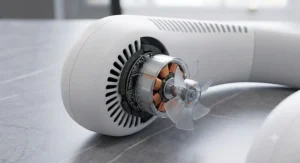
Rounding out the list is the Peiyuu LED Neck Fan, a 5200mAh model built around a copper brushless motor — a detail that matters more than it sounds, because brushless motors typically run cooler, quieter and last considerably longer than the cheaper brushed motors found in some rival budget fans.
With three adjustable speed settings and a claimed 3 to 12 hours of continuous cooling depending on speed, plus a built-in LED display for tracking charge status, this fan positions itself as the budget option that doesn’t feel like it’s cutting corners on the parts that actually wear out over time. Based on the spec comparison, the brushless motor is the standout technical decision here: cheaper fans that use brushed motors tend to lose power output and get noisier as the brushes wear down over months of use, while brushless designs largely avoid that degradation curve.
Review sentiment for this model and similar Peiyuu products tends to highlight the LED display as a welcome extra at this price point, letting users track battery status without guesswork, alongside general satisfaction with the 5200mAh capacity relative to cost. Some feedback notes the three-speed range feels slightly coarse compared with fans offering finer digital control.
Pros:
- ✅ Brushless motor should outlast cheaper brushed alternatives
- ✅ LED display tracks battery status at a glance
- ✅ Strong 5200mAh capacity for its typical price bracket
Cons:
- ❌ Only three speed settings, coarser than digital-dial rivals
- ❌ Less established brand history than JISULIFE or TORRAS
Usually found in the £15-£25 range, the Peiyuu LED Neck Fan is worth a look if you want a longer-lasting motor without stretching into mid-range pricing.
Practical Usage Guide: Getting the Most From Your Fan
Buying the right rechargeable neck fan is only half the job — how you charge and use it in the first month genuinely affects both performance and long-term battery health.
First charge: Give any new lithium-ion fan a full charge before first use, even if the box shows some charge already. This lets the battery management circuit calibrate properly, so the displayed percentage (on models with an LED display like the Warmco Portable Neck Fan or Peiyuu LED Neck Fan) reads accurately from day one.
Daily charging habits: Lithium-ion batteries — the type used in every fan in this guide — degrade fastest when regularly run down to 0% or left on charge at 100% for extended periods. Topping up from around 20-30% rather than waiting for a full drain, and unplugging once it hits 100% rather than leaving it overnight on the cable, meaningfully extends the number of charge cycles you’ll get before capacity starts noticeably dropping.
Common first-30-days mistakes: The most frequent error isn’t misuse of the fan itself — it’s using the wrong charger. A slow 5V/1A phone charger will charge a fan like the JISULIFE FA14 far more slowly than its rated 5V/2A input, and mismatched cables are the single biggest cause of “why won’t this charge properly” complaints in aggregated reviews. Always check the fan’s rated input voltage and amperage before assuming any USB-C cable and plug will do the job at full speed.
Maintenance: Wipe the mesh vents weekly with a dry or barely damp cloth to stop dust building up and restricting airflow — a surprisingly common cause of fans seeming “weaker” after a few months when the motor itself is perfectly fine. Store the fan somewhere cool and dry between uses; leaving any lithium battery in a hot car or direct sun accelerates capacity loss regardless of which model you own.
Real-World Scenarios: Matching the Fan to the Person
Specs only mean so much until you picture yourself actually using the thing. Here’s how three common buyer profiles map onto this list.
The daily commuter, 30-45 minute journeys twice a day: Efficiency and quiet operation matter more than marathon battery life here, since you’re only running the fan for short, predictable bursts. The Geepas 2000mAh Neck Fan, with its verified 38dB noise level and roughly 4-hour medium-speed runtime, comfortably covers a full round trip with charge to spare, and its light 239g weight won’t add bulk under a coat.
The festival-goer or multi-day traveller with limited access to power: Here, raw battery capacity genuinely earns its keep. The Warmco Portable Neck Fan‘s 10,000mAh cell and claimed 30-hour low-speed runtime mean you can realistically get through an entire festival weekend, or several long-haul flight legs and airport waits, without hunting for a socket — worth the small weight penalty for the peace of mind.
Anyone dealing with genuine heat intolerance, hot flushes, or working outdoors in direct sun: Airflow alone often isn’t enough when the ambient temperature itself is high. The TORRAS COOLiFY‘s semiconductor cooling plate delivers an actual temperature drop against the skin rather than just moving hot air around, making it the more appropriate — if pricier — choice for anyone who needs more than a breeze.
✨ Don’t Miss These Exclusive Deals!
🔍 Take your search for the right rechargeable neck fan to the next level with the models highlighted throughout this guide. Click through to check current pricing and availability on any fan that catches your eye — the right pick could make the rest of this summer a lot more bearable.
USB Rechargeable Neck Fan: How Long Does the Battery Really Last?
How long does a USB rechargeable neck fan’s battery last? Runtime typically ranges from 3 to 30 hours per charge, depending almost entirely on which speed setting you use and how large the battery is. Manufacturer claims are usually measured on the lowest speed setting, so real-world use on medium or high will run noticeably shorter than the number printed on the box.
This is the single most misunderstood spec in the entire category, so it’s worth breaking down properly. A fan advertising “up to 16 hours” is describing its lowest, gentlest setting — the kind of airflow that’s barely more than a whisper. Independent testing of the Geepas 2000mAh Neck Fan found it ran 4 hours 17 minutes on medium, a fraction of any headline “up to” figure you’d see for a similarly sized battery on its lowest setting. That’s not a defect; it’s simply how the maths of fan speed and power draw works, and it applies to every model in this guide, not just budget ones.
If long battery life on a single charge is your genuine priority — for travel, festivals, or long shifts without power access — look specifically at capacity-first models like the Warmco Portable Neck Fan at 10,000mAh, rather than assuming any “rechargeable” label guarantees all-day use on higher speeds. Conversely, if you mainly need short daily bursts, a smaller, lighter, more efficient battery like the one in the Geepas 2000mAh Neck Fan will comfortably outlast your actual use case despite its modest headline number, while staying noticeably lighter around your neck.
mAh Battery Capacity Explained: What the Numbers Actually Mean
What does mAh mean on a portable fan? mAh stands for milliamp-hours, a measure of how much electrical charge a battery can store. A higher mAh figure generally means more stored energy and, in theory, longer runtime — but the real-world result also depends on motor efficiency, fan speed, and physical fan design, so mAh alone doesn’t tell the whole story.
Here’s what most buyers overlook: two fans with identical mAh ratings can deliver meaningfully different runtimes because motor efficiency varies between brands and models. The Peiyuu LED Neck Fan‘s copper brushless motor, for instance, is designed to draw power more efficiently than a cheaper brushed motor of similar output, which is why brushless designs tend to outperform their raw mAh number would suggest compared with brushed rivals.
As a rough real-world guide across the fans in this article: a 2000mAh battery like the Geepas 2000mAh Neck Fan‘s typically supports several hours of light-to-medium use; a 4000-6000mAh battery, as found in the JISULIFE FA14, Yannovus Cooling Plate Fan and TORRAS COOLiFY, comfortably covers a full working day on moderate settings; and an 8000-10,000mAh cell, like those in the PluvoFan Slim and Warmco Portable Neck Fan, is built for multi-day use without recharging. When comparing mAh figures across listings, also check the battery’s voltage — most neck fans run at 3.7V, and converting to watt-hours (mAh × voltage ÷ 1000) gives a more directly comparable energy figure than mAh alone, particularly relevant if you’re also thinking about flying with the fan, since airline lithium-ion battery limits are set in watt-hours rather than mAh, not the raw capacity figure printed on the box.
USB-C Fast Charge: Finding the Best USB-C Rechargeable Neck Fan
Charging speed is the quietly important spec that most buying guides skip entirely, and it’s worth understanding before you assume every USB-C neck fan charges at the same rate.
USB-C is now the standard connector across every fan in this guide, which is good news for cable clutter — you likely already own a compatible cable. But “USB-C” describes the physical connector, not the charging speed itself; that’s determined by the fan’s rated input voltage and amperage, which varies model to model. The JISULIFE FA14, for example, is rated for 5V/2A input and takes roughly 3.5-4.5 hours for a full charge from flat, while the Geepas 2000mAh Neck Fan‘s smaller battery charges in around 2.5 hours on its own rated input. Plugging either into a slower legacy charger rated at 5V/1A will roughly double those charging times, regardless of how fast the fan itself is theoretically capable of charging.
What most buyers overlook about “fast charge” claims is that the fan’s own internal charging circuit sets a hard ceiling — using a more powerful 65W laptop charger won’t charge a fan any faster than its rated input allows, since the fan itself only draws what it’s designed to accept. If quick top-ups matter to you — say, a 15-minute charge before you head out — check the manufacturer’s specific charge-time figures for that model at its rated input, rather than assuming USB-C alone guarantees speed. As a rule of thumb, smaller-capacity fans like the Geepas 2000mAh Neck Fan will always recharge faster in absolute terms than larger-capacity fans like the Warmco Portable Neck Fan, purely because there’s less energy to push back in.
Rechargeable Neck Fan vs Handheld Fan vs Desk Fan
It’s worth being honest about where a neck fan genuinely beats the alternatives, and where it doesn’t.
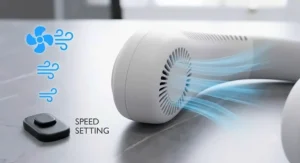
A handheld fan is cheaper and often more powerful for its size, but it demands one of your hands permanently — impossible while carrying shopping, holding a child’s hand, or typing. A rechargeable neck fan trades some raw power for being completely hands-free, which matters enormously the moment you actually need both hands for something else, which is most of the time. Desk fans, meanwhile, win on raw airflow and don’t rely on a battery at all, but they’re rooted to one spot; the second you get up from your desk, the cooling stops. A neck fan travels with you between the kitchen, the garden, and the school run without missing a beat.
Where neck fans lose out is total airflow volume and, for the cheaper models, subtlety of direction — a desk fan can comfortably cool an entire room, while even the strongest neck fan is really only cooling the person wearing it. That’s not a flaw so much as a different design brief: a neck fan is personal cooling, not room cooling, and buying one expecting desk-fan-level room impact will always disappoint. If you split your day between a fixed desk and moving around outdoors, owning both a cheap desk fan and something like the JISULIFE FA14 for when you’re mobile genuinely covers more bases than either alone.
Common Mistakes When Buying a Rechargeable Neck Fan
Buying on mAh number alone. As covered above, raw battery capacity is only part of the runtime equation — motor efficiency and speed settings matter just as much, so a smaller-battery fan with an efficient motor can genuinely outlast a bigger, less efficient one in real use.
Ignoring noise levels. A fan that’s powerful but loud gets used less often, particularly in offices or on public transport where you’d rather not draw attention. Look for a specific decibel figure where available, like the Geepas 2000mAh Neck Fan‘s independently measured 38dB, rather than vague “quiet operation” marketing copy.
Assuming bigger is always better for comfort. A large-capacity battery like the one in the Warmco Portable Neck Fan adds genuine weight around your neck. For short daily use, that trade-off often isn’t worth it, and a lighter fan will feel more comfortable over a full day even with a smaller runtime.
Overlooking charging speed. Runtime gets all the attention, but a fan that takes five hours to charge fully is genuinely inconvenient if you regularly need a quick top-up between uses. Check rated charge times, not just battery capacity.
Not checking motor type where it’s stated. A brushless motor, like the one in the Peiyuu LED Neck Fan, tends to last considerably longer than a brushed equivalent, which matters if you plan to use the fan daily across multiple summers rather than for one trip.
Long-Term Cost & Maintenance
A rechargeable neck fan’s real cost isn’t the sticker price — it’s the sticker price divided by however many summers it actually survives. Lithium-ion batteries in this category typically retain meaningful capacity for 300-500 full charge cycles before performance noticeably declines, which, for a fan used daily through a UK summer, generally translates to two to four years of solid use depending on charging habits.
Cheaper fans built around brushed motors, unlike the brushless design in the Peiyuu LED Neck Fan, tend to show reduced airflow and increased noise as brushes wear, often within twelve to eighteen months of regular use — a hidden cost that doesn’t show up on the price tag but does show up in how often you end up replacing the whole unit. Factoring in that a £90-140 premium fan like the TORRAS COOLiFY with active cooling genuinely does something a £20 fan can’t (actual temperature reduction, not just airflow), the higher price is more defensible for buyers with a genuine medical or comfort need, while casual users are unlikely to notice enough day-to-day benefit to justify the gap over a mid-range option like the JISULIFE FA14.
Cost-per-use also depends heavily on charging habits. Repeatedly running any lithium battery flat to zero, or leaving it on charge well past 100%, shortens its usable lifespan regardless of which fan you buy — so the maintenance advice earlier in this guide isn’t just about performance, it directly affects how many years you get out of your purchase before capacity loss makes it worth replacing.
Safety, Regulations & Battery Compliance
Every fan in this guide runs on a lithium-ion battery, which comes with a handful of practical rules worth knowing, particularly if you plan to travel with one.
For UK domestic use, look for CE or UKCA marking on the product packaging, which indicates the item meets UK and EU safety and electromagnetic compatibility standards for consumer electronics. If you’re planning to fly with your fan, the relevant limit is watt-hours rather than mAh: the UK Civil Aviation Authority confirms that lithium-ion batteries and power banks under 100Wh can travel in hand luggage without special approval, and every fan featured here — even the 10,000mAh Warmco Portable Neck Fan, which works out to roughly 37Wh at typical 3.7V cell voltage — sits comfortably under that threshold. As with any lithium battery, it must travel in your carry-on rather than checked luggage, since crew need to be able to respond quickly if a battery were ever to malfunction in flight.
For everyday safety, never leave a charging fan unattended on a flammable surface such as bedding, avoid charging it in direct sun or a hot car, and stop using any fan whose battery is visibly swollen or damaged. Anyone particularly vulnerable to heat — older adults, small children, or people managing existing health conditions — should treat a neck fan as one tool among several rather than a substitute for the wider guidance on staying safe in hot weather, including staying hydrated and avoiding peak-heat hours, as set out by the NHS.
How to Choose the Best Rechargeable Neck Fan for You
- Decide how long you need it to run per charge. Short daily commutes suit smaller, lighter batteries like the Geepas 2000mAh Neck Fan; multi-day trips justify the extra weight of the Warmco Portable Neck Fan‘s 10,000mAh cell.
- Check the actual charging speed, not just the connector type. USB-C is standard across this whole list, but rated input amperage determines whether a full charge takes two hours or five.
- Weigh noise level against where you’ll use it. Office and public-transport use calls for a verified low decibel figure, like the Geepas 2000mAh Neck Fan‘s tested 38dB, rather than vague marketing claims.
- Decide if you need active cooling or just airflow. If ambient heat itself is the problem rather than stuffiness, a semiconductor model like the TORRAS COOLiFY does something airflow-only fans genuinely can’t.
- Consider motor type for longevity. A brushless motor, as used in the Peiyuu LED Neck Fan, should outlast a brushed equivalent across repeated summers of use.
- Factor in physical comfort over the battery spec sheet. A slim, light design like the PluvoFan Slim may suit all-day wear better than a heavier, higher-capacity rival, even if the runtime numbers look less impressive.
- Match your budget to genuine need, not the biggest number available. A £20 fan that fits your actual use case beats an underused £120 one every time — reaching for Which?’s independently tested picks is a sensible sanity check before spending at the premium end.
Features That Actually Matter (And Those That Don’t)
Marketing copy on neck fan listings leans heavily on numbers that sound impressive but don’t always translate into a better real-world experience. A genuinely useful spec sheet focuses on rated charging input (amperage, not just “USB-C”), an actual decibel noise figure, and stated battery chemistry or cycle life where the manufacturer provides it — these three numbers tell you more about day-to-day satisfaction than almost anything else on the box.
Features that sound significant but rarely change the experience much include exaggerated “up to X hours” claims measured only on the lowest fan speed, RGB lighting or cosmetic finishes that add nothing to cooling performance, and speed-setting counts beyond about six, since most people gravitate to two or three preferred settings regardless of how many are technically available. The genuinely useful middle-ground feature worth paying a little extra for is a real-time battery display, as found on the Warmco Portable Neck Fan and Peiyuu LED Neck Fan, since knowing exactly how much charge remains is far more useful day-to-day than an extra fan speed you’ll rarely touch.
Frequently Asked Questions
❓ How long does a rechargeable neck fan battery last on one charge?
❓ Are rechargeable neck fans allowed on flights?
❓ What mAh battery is good for a neck fan?
❓ Can I use any USB-C charger to charge my neck fan faster?
❓ Do neck fans actually cool you down or just move air around?
Conclusion
Picking the right rechargeable neck fan really comes down to being honest about how you’ll actually use it, rather than chasing the biggest battery number on the listing. A daily commuter gets more genuine value from something light, quiet and efficient like the Geepas 2000mAh Neck Fan than from a bulkier, higher-capacity rival they’ll barely fully drain in a normal day. A festival-goer or frequent traveller, by contrast, genuinely benefits from the battery security of something like the Warmco Portable Neck Fan‘s 10,000mAh cell. And anyone dealing with real heat intolerance, rather than mild summer discomfort, is likely to find the active cooling of the TORRAS COOLiFY worth its premium price tag in a way a basic airflow fan simply can’t match.
Across all seven models here, the underlying lesson holds: mAh capacity, USB-C charging speed and motor type each tell you something different, and no single spec answers the whole question on its own. Match the fan to your actual routine — commute length, noise tolerance, travel plans, comfort with heat — and you’ll end up with a fan you reach for all summer rather than one that ends up in a drawer by August.
Recommended for You
- Quietest Neck Fan 2026: 7 Silent Picks for Work & Home
- Bladeless Neck Fan: 7 Best Hair-Safe Picks for UK Summer 2026
- Best Neck Fan 2026: 7 Wearable Picks That Actually Cool You
Disclaimer: This article contains affiliate links. As an Amazon Associate, I earn from qualifying purchases. If you purchase products through these links, we may earn a small commission at no additional cost to you.
✨ Found this helpful? Share it with your friends! 💬🤗
